Buy cbc.li ?
We are moving the project
cbc.li .
Are you interested in purchasing the domain
cbc.li ?
domain@kv-gmbh.de · 0541-91531010
Buy cbc.li ?
Which radio stations offer different knowledge, culture, information, and news content?
There are several radio stations that offer a variety of knowledge, culture, information, and news content. For example, NPR (National Public Radio) is known for its in-depth news coverage and cultural programming. BBC World Service provides international news and cultural insights from around the globe. Additionally, local public radio stations often offer a mix of news, cultural programming, and educational content tailored to their communities. **
How can I create a second desktop using Remote Desktop?
To create a second desktop using Remote Desktop, you can follow these steps: 1. Open Remote Desktop and connect to the remote computer. 2. Once connected, go to the Start menu and click on the "New Desktop" button. 3. This will create a second desktop on the remote computer, allowing you to switch between the two desktops as needed. 4. You can then open and work on different applications and files on each desktop independently. **


Similar search terms for Desktop
Top-Angebote
Products related to Desktop:
-
Uplift Essentials Digital 3 Speed Rechargeable Desktop Fan Digital 3 Speed Rechargeable Desktop FanSuffering through stuffy, stagnant college dorm rooms, enduring thick summer humidity at your study desk, or trying to focus while a loud, clunky fan rattles next to your computer can make working or relaxing impossible. This premium mini portable...135,97 $*Shipping: 0,00 $Secure redirect to the provider
-
Uplifted Finds Creative Hamburger Shaped Desktop Tissue Box Creative Hamburger Shaped Desktop Tissue BoxTake absolute control of your living room real estate and establish flawless structural order over your paper supplies with this creative hamburgershaped retro tissue box. Masterfully engineered as a highcapacity horizontal containment deck, this...34,97 $*Shipping: 0,00 $Secure redirect to the provider
-
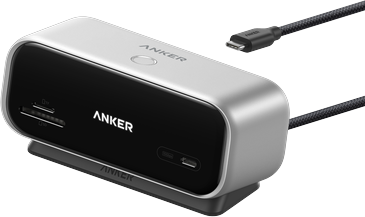
Anker Desktop USB-C HubAll-in-One Connectivity: The 10-in-1 design features one HDMI 2.1 port, one DisplayPort 1.4 port, one 100W max PD-IN port for up to 80W host charging, one 10 Gbps USB-C port, one 10 Gbps USB-A data port, two 5 Gbps USB-A ports, one Gigabit Ethernet...74,99 $*Shipping: 0,00 $Secure redirect to the provider
-
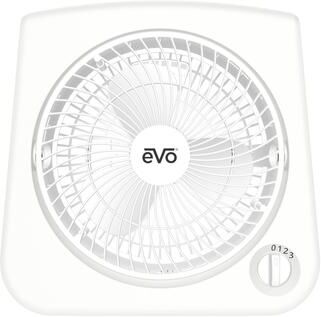
EVO Square Desktop Turbo FanCool off with the EVO Square Turbo Fan, designed to deliver powerful airflow right where you need it. With manual controls and three speed settings—Low, Medium, and High—you can easily adjust for the perfect breeze.34,99 $*Shipping: 0,00 $Secure redirect to the provider


-
How do I remove the desktop folder from the desktop?
To remove the desktop folder from your desktop, you can simply right-click on the folder and select "Delete" or "Remove." Alternatively, you can drag the folder to the Recycle Bin or Trash to delete it. If you want to keep the folder but remove it from the desktop, you can move it to another location on your computer, such as the Documents or Downloads folder. **
-
How can I keep certain desktop icons on my desktop?
To keep certain desktop icons on your desktop, you can create a shortcut for the specific files or folders you want to keep visible. Right-click on the file or folder, select "Create shortcut," and then drag the shortcut to your desktop. This will create a separate icon on your desktop that will remain there even if you move or delete the original file or folder. You can also organize these shortcuts into a specific section of your desktop to keep them easily accessible. **
-
How can I project my desktop to the television over LAN?
To project your desktop to the television over LAN, you can use a technology called Miracast or a wireless display adapter. First, ensure that your television supports Miracast or has an HDMI port for the wireless display adapter. Then, connect your computer and television to the same LAN network. Finally, follow the instructions on your computer to project your desktop to the television using the Miracast feature or the wireless display adapter. **
-
Web or desktop GUIs?
The choice between web or desktop GUIs depends on the specific requirements of the project. Web GUIs are more accessible as they can be accessed from any device with a browser, while desktop GUIs offer better performance and can work offline. If the application needs to be used across different devices and locations, a web GUI might be more suitable. However, if the application requires complex functionalities and high performance, a desktop GUI could be the better choice. **


Is Docker Desktop secure?
Docker Desktop is generally considered to be secure, as it provides isolation between containers and the host system. However, like any software, there may be vulnerabilities that could potentially be exploited. It is important to keep Docker Desktop up to date with the latest security patches and follow best practices for securing containerized applications. Additionally, users should be cautious when downloading and running images from untrusted sources to minimize security risks. **
Has my desktop disappeared?
It is possible that your desktop icons or files may have been hidden or moved. You can try right-clicking on the desktop and selecting "View" and then "Show desktop icons" to see if they reappear. Additionally, check if you have accidentally changed the desktop background to a solid color, which may make it seem like the desktop has disappeared. If these steps do not work, you may need to troubleshoot further or seek technical assistance. **
Top-Angebote
Products related to Desktop:
-
William Collins Everything in Moderation by Daniel Finkelstein - Paperback - Best Times Columns on Politics, Culture & Life - Non Fiction Gift BookEverything in Moderation gathers the best of Daniel Finkelstein's Times columns into one satisfying paperback. Spanning politics, culture, history, and everyday life, Finkelstein writes with warmth, wit, and intelligence. Whether dissecting election results, defending suburban life, or reflecting on his family history, every piece is a masterclass in clear thinking. This book is perfect for those who enjoy thoughtful, funny, and humane journalism, making it great for dipping into again and again. Daniel Finkelstein is a widely read newspaper columnist, and this collection showcases his writing skills. The pieces here range across a broad range of subjects, including predicting elections, the political science behind Ed Miliband's defeat, and the base rate of coups.6,49 £*Shipping: 2,99 £Secure redirect to the provider
-
Uplift Essentials Digital 3 Speed Rechargeable Desktop Fan Digital 3 Speed Rechargeable Desktop FanSuffering through stuffy, stagnant college dorm rooms, enduring thick summer humidity at your study desk, or trying to focus while a loud, clunky fan rattles next to your computer can make working or relaxing impossible. This premium mini portable...135,97 $*Shipping: 0,00 $Secure redirect to the provider
-
Uplifted Finds Creative Hamburger Shaped Desktop Tissue Box Creative Hamburger Shaped Desktop Tissue BoxTake absolute control of your living room real estate and establish flawless structural order over your paper supplies with this creative hamburgershaped retro tissue box. Masterfully engineered as a highcapacity horizontal containment deck, this...34,97 $*Shipping: 0,00 $Secure redirect to the provider
-
Which radio stations offer different knowledge, culture, information, and news content?
There are several radio stations that offer a variety of knowledge, culture, information, and news content. For example, NPR (National Public Radio) is known for its in-depth news coverage and cultural programming. BBC World Service provides international news and cultural insights from around the globe. Additionally, local public radio stations often offer a mix of news, cultural programming, and educational content tailored to their communities. **
-
How can I create a second desktop using Remote Desktop?
To create a second desktop using Remote Desktop, you can follow these steps: 1. Open Remote Desktop and connect to the remote computer. 2. Once connected, go to the Start menu and click on the "New Desktop" button. 3. This will create a second desktop on the remote computer, allowing you to switch between the two desktops as needed. 4. You can then open and work on different applications and files on each desktop independently. **
-
How do I remove the desktop folder from the desktop?
To remove the desktop folder from your desktop, you can simply right-click on the folder and select "Delete" or "Remove." Alternatively, you can drag the folder to the Recycle Bin or Trash to delete it. If you want to keep the folder but remove it from the desktop, you can move it to another location on your computer, such as the Documents or Downloads folder. **
-
How can I keep certain desktop icons on my desktop?
To keep certain desktop icons on your desktop, you can create a shortcut for the specific files or folders you want to keep visible. Right-click on the file or folder, select "Create shortcut," and then drag the shortcut to your desktop. This will create a separate icon on your desktop that will remain there even if you move or delete the original file or folder. You can also organize these shortcuts into a specific section of your desktop to keep them easily accessible. **
Similar search terms for Desktop
-
Anker Desktop USB-C HubAll-in-One Connectivity: The 10-in-1 design features one HDMI 2.1 port, one DisplayPort 1.4 port, one 100W max PD-IN port for up to 80W host charging, one 10 Gbps USB-C port, one 10 Gbps USB-A data port, two 5 Gbps USB-A ports, one Gigabit Ethernet...74,99 $*Shipping: 0,00 $Secure redirect to the provider
-
EVO Square Desktop Turbo FanCool off with the EVO Square Turbo Fan, designed to deliver powerful airflow right where you need it. With manual controls and three speed settings—Low, Medium, and High—you can easily adjust for the perfect breeze.34,99 $*Shipping: 0,00 $Secure redirect to the provider
-
Uplifted Goods Mechanical Desktop Power Switch With LED Light Mechanical Desktop Power Switch With LED LightUpgrade your computing setup with the Mechanical Desktop Power Switch with LED Light. This highquality external controller is meticulously engineered to provide a tactical and accessible way to power your PC without reaching for the chassis....44,97 $*Shipping: 0,00 $Secure redirect to the provider
-
United Desktop Wall Mounted Air Circulation Fan With Light Portable Desktop Fan For Home Office beigeExperience cool, refreshing airflow wherever you need it most with this wall mounted fan designed for flexible everyday comfort. Whether you're working, relaxing, or cooking, this compact desktop fan delivers focused cooling without taking up...139,97 $*Shipping: 0,00 $Secure redirect to the provider
-
How can I project my desktop to the television over LAN?
To project your desktop to the television over LAN, you can use a technology called Miracast or a wireless display adapter. First, ensure that your television supports Miracast or has an HDMI port for the wireless display adapter. Then, connect your computer and television to the same LAN network. Finally, follow the instructions on your computer to project your desktop to the television using the Miracast feature or the wireless display adapter. **
-
Web or desktop GUIs?
The choice between web or desktop GUIs depends on the specific requirements of the project. Web GUIs are more accessible as they can be accessed from any device with a browser, while desktop GUIs offer better performance and can work offline. If the application needs to be used across different devices and locations, a web GUI might be more suitable. However, if the application requires complex functionalities and high performance, a desktop GUI could be the better choice. **
-
Is Docker Desktop secure?
Docker Desktop is generally considered to be secure, as it provides isolation between containers and the host system. However, like any software, there may be vulnerabilities that could potentially be exploited. It is important to keep Docker Desktop up to date with the latest security patches and follow best practices for securing containerized applications. Additionally, users should be cautious when downloading and running images from untrusted sources to minimize security risks. **
-
Has my desktop disappeared?
It is possible that your desktop icons or files may have been hidden or moved. You can try right-clicking on the desktop and selecting "View" and then "Show desktop icons" to see if they reappear. Additionally, check if you have accidentally changed the desktop background to a solid color, which may make it seem like the desktop has disappeared. If these steps do not work, you may need to troubleshoot further or seek technical assistance. **
* All prices are inclusive of VAT and, if applicable, plus shipping costs. The offer information is based on the details provided by the respective shop and is updated through automated processes. Real-time updates do not occur, so deviations can occur in individual cases. ** Note: Parts of this content were created by AI.